From Slides to Stories: How Educators Are Using AI Video to Multiply Course Engagement
Tutorials & Tips
5 Min Read

Here's a scenario that every online educator will recognize: you've spent weeks crafting a detailed course module. The research is solid, the explanations are clear, the PDF is polished. You hit publish, and the completion rate sits at 31%.
It's not that the content is bad. It's that the format is fighting the learner.
Static text and slides ask learners to do a lot of heavy lifting: to visualise, to stay focused, to extract meaning from dense paragraphs. Video, on the other hand, does the work for them. It combines narration, pacing, and visuals into a format that the human brain is literally wired to absorb faster.
This is the gap that AI video tools are closing for educators right now. And the results aren't marginal. They're transformational.
Online courses that include video content see up to 83% higher completion rates
compared to text-only formats. (Coursera Learning Report, 2024)
The Engagement Problem No One Talks About
The e-learning industry crossed $250 billion globally in 2024, and projections have it doubling by 2030. Yet the industry's most embarrassing open secret is this: the average completion rate for a free online course is just 13%. Even paid courses average only around 30–40%.
The bottleneck isn't content quality. It's content delivery.
Learners today, whether they're university students, corporate employees upskilling, or self-taught professionals, consume information through video. YouTube, Instagram Reels, TikTok: these platforms have fundamentally rewired expectations around how knowledge should be delivered. Short, visual, narrated, on-demand.
When educators stick to PDFs, text modules, and static PowerPoints, they're not just choosing an older format. They're choosing a format that competes poorly for attention against everything else on a learner's screen.

Why Most Educators Don't Make Videos (And Why That's
Changing)
Ask any course creator why they rely on text and slides, and the answer almost always comes down to three things: time, cost, and technical skill.
Producing a professional course video traditionally means:
• A script: hours of writing and refining
• Recording equipment: microphone, lighting, camera setup
• A voiceover or on-camera presenter: scheduling, takes, editing
• Post-production: editing software, captions, music, exports
• A distribution workflow: uploading, formatting for each platform
For a single 5-minute lesson, this process can take a full day. For a 10-module course, it can take weeks, or stretch a budget that most independent educators simply don't have.
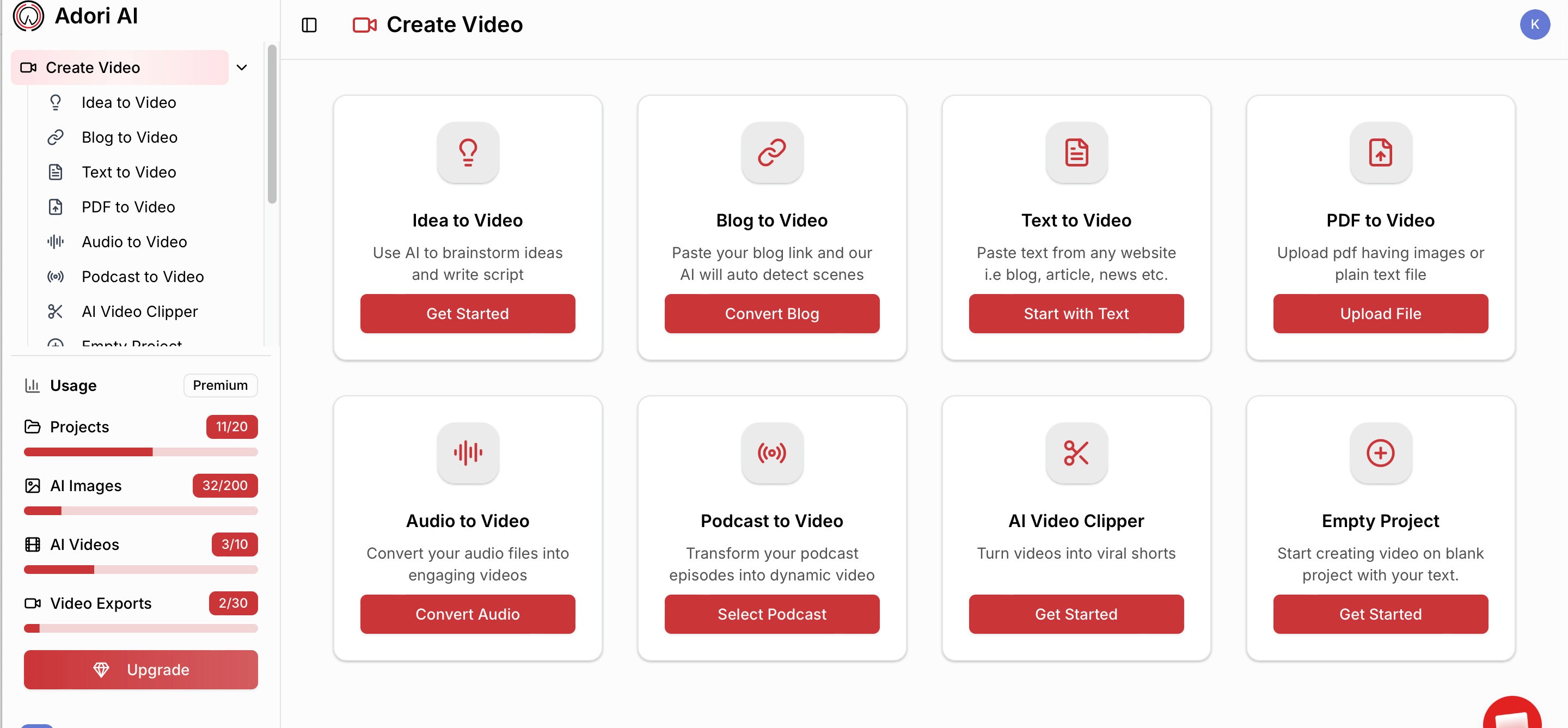
This is precisely why AI video tools are reshaping education. Platforms like Adori AI
collapse this entire process. An educator with a blog post, a PDF, or even rough notes can now produce a narrated, visually rich, export-ready video, with no camera, no studio, and no production team required.
What AI-Generated Video Actually Looks Like for Educators
Let's be specific, because 'AI video' can mean a lot of things. Here's how Adori AI works in practice for an education use case:
Text to AI Video: From Notes to Narrated Lesson
Say you've written a 1,200-word explainer on The Fundamentals of Supply and Demand for your economics course. Instead of turning that into a 40-slide deck, you paste it into Adori AI. The platform reads the structure, identifies key concepts, and builds a scene-by-scene video narrative, complete with auto-matched visuals from a library of over a million assets, a professional AI voiceover, and synced captions.
The output isn't a talking-head video or a screengrab of your notes. It's a produced content video with pacing, transitions, and a visual layer that reinforces what the narration is saying.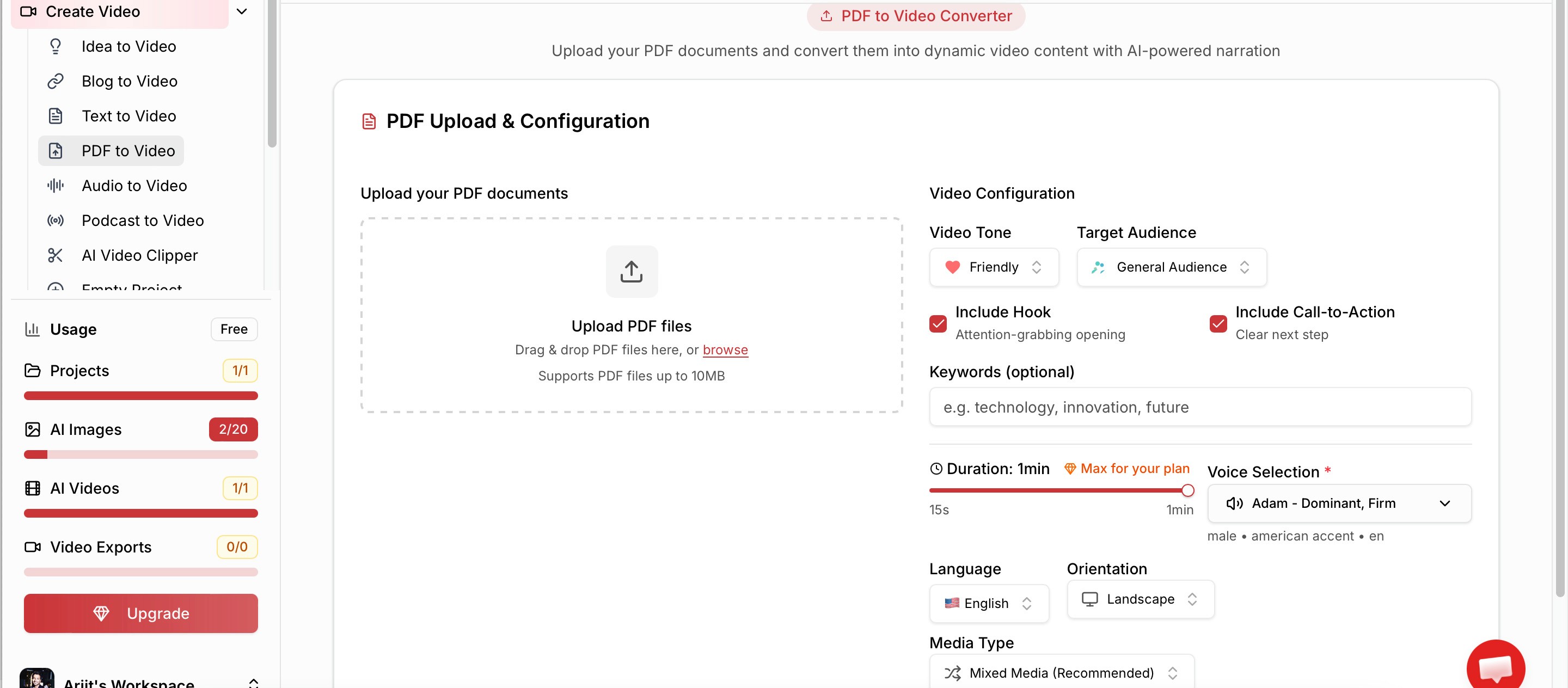
Turn Blogs into Video: Repurpose Your Existing Content
Most educators are sitting on a goldmine they don't recognise: years of written content: blog posts, email newsletters, course notes, guides. Every one of those pieces is a video waiting to happen.
Adori AI's blog-to-video feature lets you paste a URL or upload a document and converts it into a structured video within minutes. For a course creator, this means your existing content library can become an entirely new distribution channel, including YouTube, Instagram and LinkedIn, without any additional writing.
One educator running a personal finance training platform used this workflow to convert 30 archived blog posts into short-form videos over a single weekend. The result: a YouTube channel that grew from zero to 4,200 subscribers in 60 days, with video traffic back to the course platform increasing by 38%.AI Voiceovers Across 40+ Voices: Reach Global Learners
One of the most underrated challenges in online education is language and accessibility. A course designed for English speakers immediately excludes a massive portion of the global learning market.
Adori AI's voiceover engine supports 40+ lifelike voices across multiple languages and accents. For an educator who wants to localise their course for Spanish, Hindi, French, or Portuguese speakers, this removes an enormous barrier. Instead of hiring voice actors or recording multiple versions, you simply select the language and voice style, and the platform handles the rest.Auto-Captions: Essential for Modern Learning
Research from Ofcom found that 80% of viewers watch video with captions on, even when they're not deaf or hard of hearing. For education content specifically, captions dramatically improve comprehension, especially for learners consuming content in their second language or in noisy environments.
Adori AI generates perfectly synced auto-captions as part of its standard workflow. There's no separate step, no external tool, no manual timing. The captions appear on export, ready to publish.The Media Library: No Stock Subscription Needed
Adori AI includes access to a library of 100 million copyright-free photos, video clips, and background music tracks. The AI contextually matches assets to your script, so a lesson on climate change auto-pulls satellite imagery and environmental footage, not generic business stock photos.
For educators, this means the visual quality of your video is handled automatically. You don't need a Shutterstock subscription, a design eye, or manual asset searching.
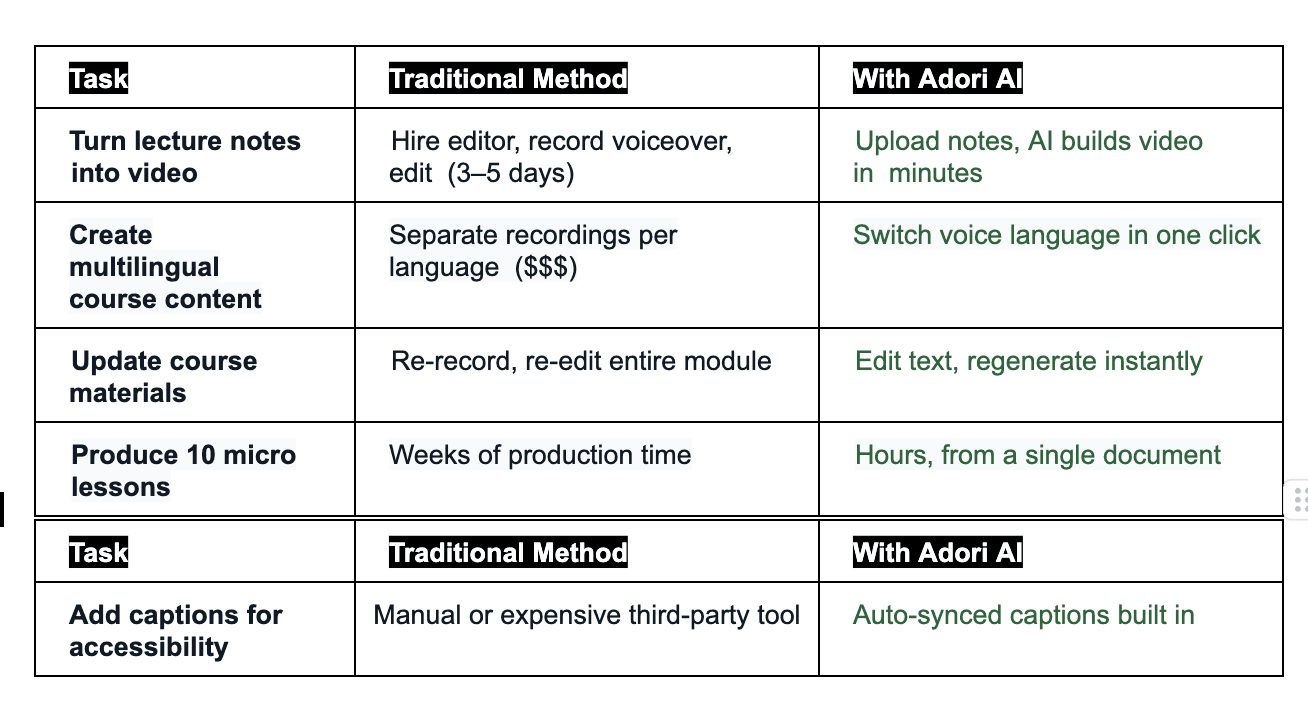
Traditional Video Production vs. Adori AI: A Direct Comparison
Step-by-Step: Building a Course Video with Adori AI
Here's exactly how an educator can go from a written lesson to a published video in under 30 minutes:
Step 1: Upload Your Content
Log into Adori AI and paste your blog URL, upload your PDF lesson notes, or type your content directly into the editor. The platform accepts text, PDFs, audio files, and even existing podcast transcripts.
Step 2: AI Storyboarding
Adori AI analyses your content and breaks it into scenes, each with a key concept, a visual suggestion, and a narration segment. You can review and edit the storyboard before
proceeding, or let the AI run with it.
Step 3: Choose Your Voice & Style
Select a voiceover from the 40+ AI voices. For education content, a clear, measured tone in the learner's primary language works best. You can preview each voice before committing.
Step 4: Review in the Live Editor
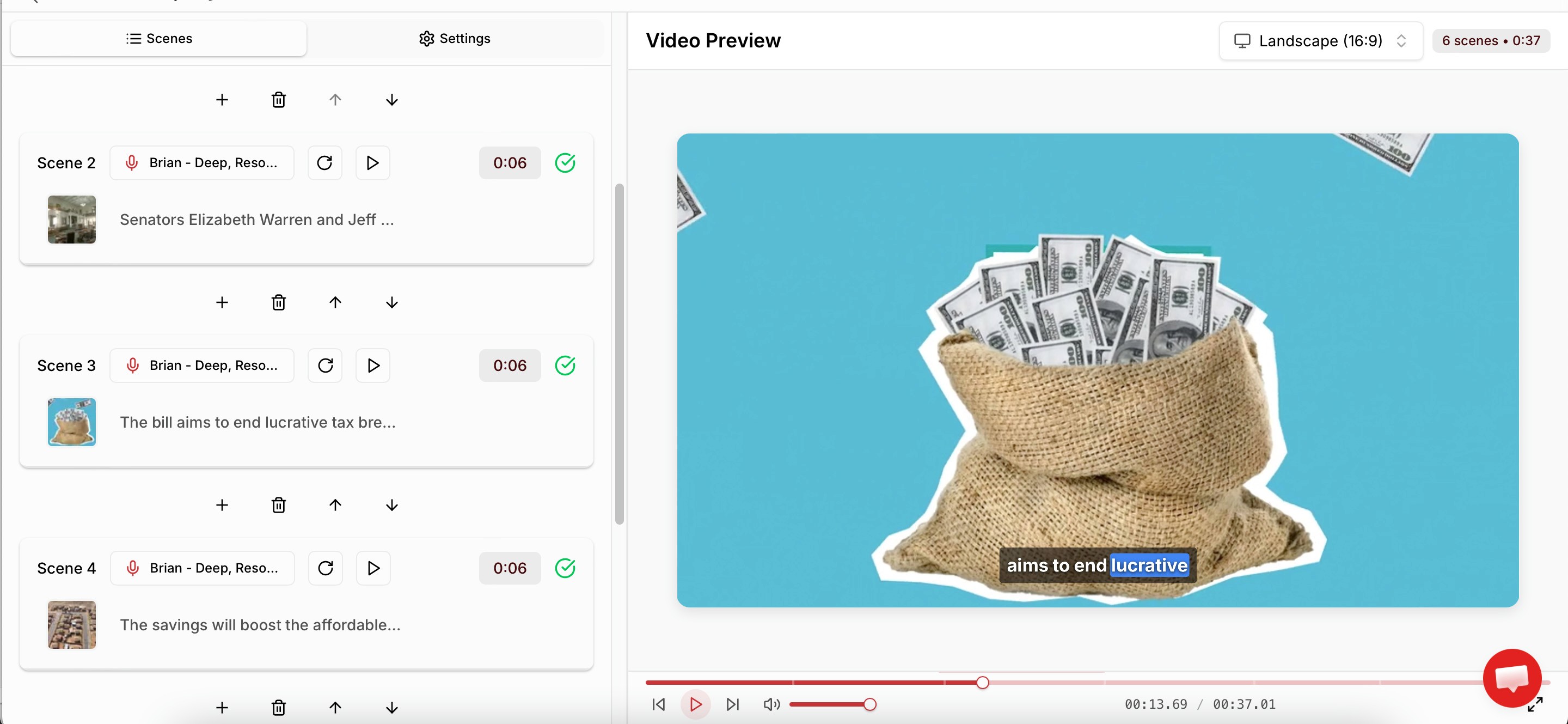
Adori AI's live editor lets you preview the video in real time, swap out visual assets, adjust scene timing, edit captions, and add or remove scenes. Changes are instant with no rendering wait time.
Step 5: Export & Publish
Export in the format you need: widescreen (16:9) for YouTube and your LMS, vertical (9:16) for Instagram Reels or TikTok, or both simultaneously. Publish directly to YouTube without leaving the platform.
In Practice: How a Coding Bootcamp Scaled Its Content with AI Video
A mid-sized online coding bootcamp offering Python, JavaScript and data science tracks faced a familiar challenge: their course completion rates were hovering at 28%, and learners consistently cited 'too much reading, not enough visual explanation' in exit surveys.
Their team had 200+ written lessons and concept explainers sitting in Notion. The content was strong. The format was the problem.
They piloted Adori AI over a single quarter with three goals: convert their most-dropped modules into video format, create short-form preview clips for social media, and test whether video completions would outperform text completions.
The results after 90 days:

The most impactful finding: learners who watched the AI-generated video versions of complex modules (recursion, API calls, data visualisation) scored 22% higher on end-of-module assessments than those who completed the text equivalent.
This isn't a fluke. It reflects what neuroscience has consistently shown: multi-modal learning, where information is delivered through both audio and visual channels simultaneously, improves retention and application significantly more than single-channel text formats.
Who Should Be Using AI Video Tools for Education?
Adori AI is built for anyone creating educational content at scale, but a few specific use cases stand out:
• Independent course creators on Teachable, Thinkific, or Kajabi: Turn your existing
course notes and blog content into video modules without a production budget.
• Corporate L&D teams: Convert SOPs, compliance documents, and onboarding
manuals into engaging training videos that staff actually watch.
• University educators: Supplement lectures with short-form concept videos that
learners can rewatch, pause, and review at their own pace.
• Coaching and consulting businesses: Repurpose frameworks, guides, and workshop materials into video content that builds authority and drives programme enquiries.
• EdTech platforms: Scale content production across subject areas without scaling the team. The AI handles the video making while your team focuses on curriculum.
The Bigger Picture: Video Isn't an Add-On, It's the Strategy
There's a tempting way to think about AI video tools: as a nice-to-have, a time-saver, a way to
repurpose content more efficiently. That framing undersells what's happening.
The educators who are winning right now, in terms of completion rates, organic reach, learner retention and course revenue, are the ones who have committed to video as their primary content format. Not as a supplement to text. As the lead format.
AI video making tools like Adori AI aren't just making video production faster. They're removing the cost and complexity barriers that have kept text-based education dominant for decades.
When a single educator can turn a PDF into a produced, narrated, captioned, platform-ready AI-generated video in 20 minutes, the question stops being 'should I make video content?' and becomes 'why am I still not doing this?'
The educators who adopt AI video tools now aren't just keeping up with a trend. They're building a content infrastructure that compounds. Every module you convert, every blog you repurpose, every lesson you localize becomes an asset that continues attracting and retaining learners for years.
Ready to Transform Your Course Content?
Adori AI is purpose-built for creators who want professional-quality content videos without the production overhead. Whether you're starting with a single blog post or an entire course curriculum, the platform takes your written content and gives it a voice, a visual layer, and a life beyond the page.
Join our newsletter list
Sign up to get the most recent blog articles in your email every week.
Similar Topic